1
/
of
6
Flux - Splitter BLACK | CONTROL BOX > Starter & Extension | in Meters
SKU:FLUX_10cmS-10cmE YC CB>S+E_BLACK
Regular price
$24.00 USD
Regular price
$24.00 USD
Sale price
$24.00 USD
Unit price
/
per
Duties and taxes included.
Shipping calculated at checkout.
Couldn't load pickup availability
Share
Compatibility
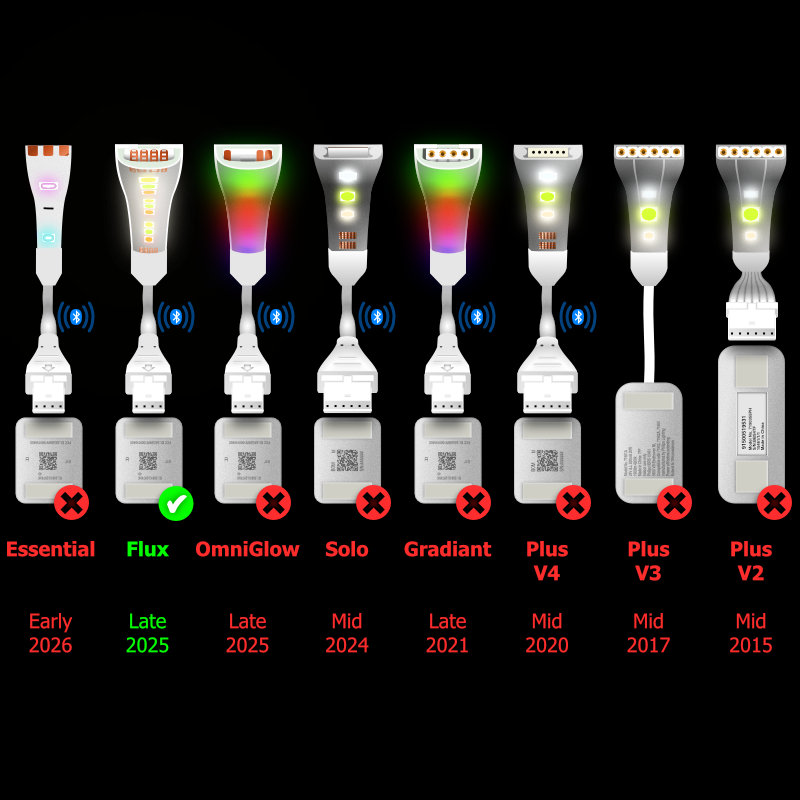
There are 8 versions of Philips Hue LightStrip, many with differing connectors. There are 3 revisions of LightStrip Plus, there is Gradient LightStrip, Solo LightStrip, OmniGlow, Flux & now Essential Strip Lights. Most versions have 2 different sized connectors, the Control Box socket and the LightStrip Extension connector, making 3 different cable combinations for each of the 8 versions. That's 24 different cables, plus splitters.
As all these cables are made to order, please ensure this cable is compatible with your LightStrip and connects between your intended sockets/connectors.
Control Box
>
Start of LightStrip
LightStrip Offcut
LightStrip Offcut
?
Other Cables
This is a custom-made Y Splitter Cable for Philips Hue Flux LightStrip that will allow you to run two Philips Hue sections of LightStrip in parallel from the same control box. With this cable, you connect the start of LightStrip into one socket and an off-cut into a snap connector.
There are multiple scenarios for which these can be used. For example, you may want to light under two different kitchen cupboards.
The gradient will be set by the longer of the two lightstrips. The gradient will mirror the other LightStrip. Each Lightstrip will start at the same colour and run in parallel with one another. If a Lightstrip is shorter, it will only show the equivalent portion of the gradient.
This cable is made with the proper connectors for the Philips Hue Flux LightStrip system, giving you perfect performance and lasting reliability.
There are multiple scenarios for which these can be used. For example, you may want to light under two different kitchen cupboards.
The gradient will be set by the longer of the two lightstrips. The gradient will mirror the other LightStrip. Each Lightstrip will start at the same colour and run in parallel with one another. If a Lightstrip is shorter, it will only show the equivalent portion of the gradient.
This cable is made with the proper connectors for the Philips Hue Flux LightStrip system, giving you perfect performance and lasting reliability.
Dimensions
< Choose the Length >
These cables are custom-made to your exact length. If your preferred size isn't available, simply purchase a longer length and let us know your specifications.
Unlike other Philips LightStrips, which are controlled by power for each of the five LED colours, Flux LightStrips are controlled by data. Since power is delivered by only one core, resistance can impact performance. This explains the limited cable length compared to other LightStrips. Cables should not be combined because the maximum length available is the longest that will work without issues.
All the cables work but when they're too long for the setup they create too much resistance causing the LightStrip to randomly flash or blink. In a controlled environment the following combinations shown with a tick work well. Those with a cross will flicker. The cable length, is the combined length of both legs of the splitter.
There's no perfect formula for what will and won't work with each setup. This is why you can return these products for free if they don't suit your particular needs.
Unlike other Philips LightStrips, which are controlled by power for each of the five LED colours, Flux LightStrips are controlled by data. Since power is delivered by only one core, resistance can impact performance. This explains the limited cable length compared to other LightStrips. Cables should not be combined because the maximum length available is the longest that will work without issues.
All the cables work but when they're too long for the setup they create too much resistance causing the LightStrip to randomly flash or blink. In a controlled environment the following combinations shown with a tick work well. Those with a cross will flicker. The cable length, is the combined length of both legs of the splitter.
Standard Flux LightStrip
| Flat Cable | Round Cable | |||||||||||
|---|---|---|---|---|---|---|---|---|---|---|---|---|
| 1m | 1.5m | 2m | 2.5m | 3m | 1m | 1.5m | 2m | 2.5m | 3m | |||
| LightStrip Lengths | 1m | |||||||||||
| 2m | ||||||||||||
| 3m | ||||||||||||
| 4m | ||||||||||||
| 5m | ||||||||||||
| 6m | ||||||||||||
Flux Ultra Bright LightStrips
| Flat Cable | Round Cable | |||||||||||
|---|---|---|---|---|---|---|---|---|---|---|---|---|
| 1m | 1.5m | 2m | 2.5m | 3m | 1m | 1.5m | 2m | 2.5m | 3m | |||
| LightStrip Length | 1m | |||||||||||
| 1.5m | ||||||||||||
| 2m | ||||||||||||
| 2.5m | ||||||||||||
| 3m | ||||||||||||
Fitting Instructions
2. Where appropriate for you, cut the lightstrip directly across the cut line.
3. Make sure the snap connector is on its back, with the curved side face down.
4. Open the small clip (with the small led symbol).
5. Push the upside-down lightstrip onto the connector, being careful to make sure the pins do not go under the contacts on the lightstrip. Most of the time, this will go on without issues. Occasionally, they may need reseating.
6. Close the clip with a firm snap.
Unlike 6-pin lightstrips, 4-pin lightstrips will only work in one direction. This can easily be identified by the larger black chip. The larger black chip sits towards the back end of the cut section. The start end of the lightstrip doesn't have this chip. For this cable ensure the snap connector is seated with black chip furthest away.
7. Plug the small male end of the cable into the connector at the start of the lightstrip. Push the pins in firmly with a very slight side to side wiggle.
The pins should push all the way in, so there is barely any pin visible.
The connectors should meet the same way up. It will not work if plugged the opposite way up. It shouldn't damage the LightStrip if you plug it the wrong way up as long as it's not powered on for hours.
They usually fit quite tightly. Since Phillips didn't design these connectors with cables in mind, there's nothing to clip or lock onto. Lightstrips only stay in place because they're stuck in place with tape. In some situations, you might need to secure the connections with insulation tape or heatshrink.
8. Plug the small female end into the control box.The connectors should meet the same way up. It will not work if plugged the opposite way up. It shouldn't damage the LightStrip if you plug it the wrong way up as long as it's not powered on for hours.
They usually fit quite tightly. Since Phillips didn't design these connectors with cables in mind, there's nothing to clip or lock onto. Lightstrips only stay in place because they're stuck in place with tape. In some situations, you might need to secure the connections with insulation tape or heatshrink.
9. When your setup is complete, plug the LightStrip back in. At this point, the LightStrip will calibrate, and you should see the connected sections light up. If a section doesn't work, the snap-on connector may need reseating. Before doing that please power off at the wall. Once it's all done, sit back and bask in the light.